Pushmate Devlog #2 - When Static Meshes Aren’t Enough: Teaching the Chessboard to React
In Devlog #1, Pushmate (working title 😏) was basically a spooky chess diorama: a nice gloomy board, chunky classic pieces… and absolutely no idea you existed.
Devlog #2 - If it’s just a static mesh, it’s scenery.
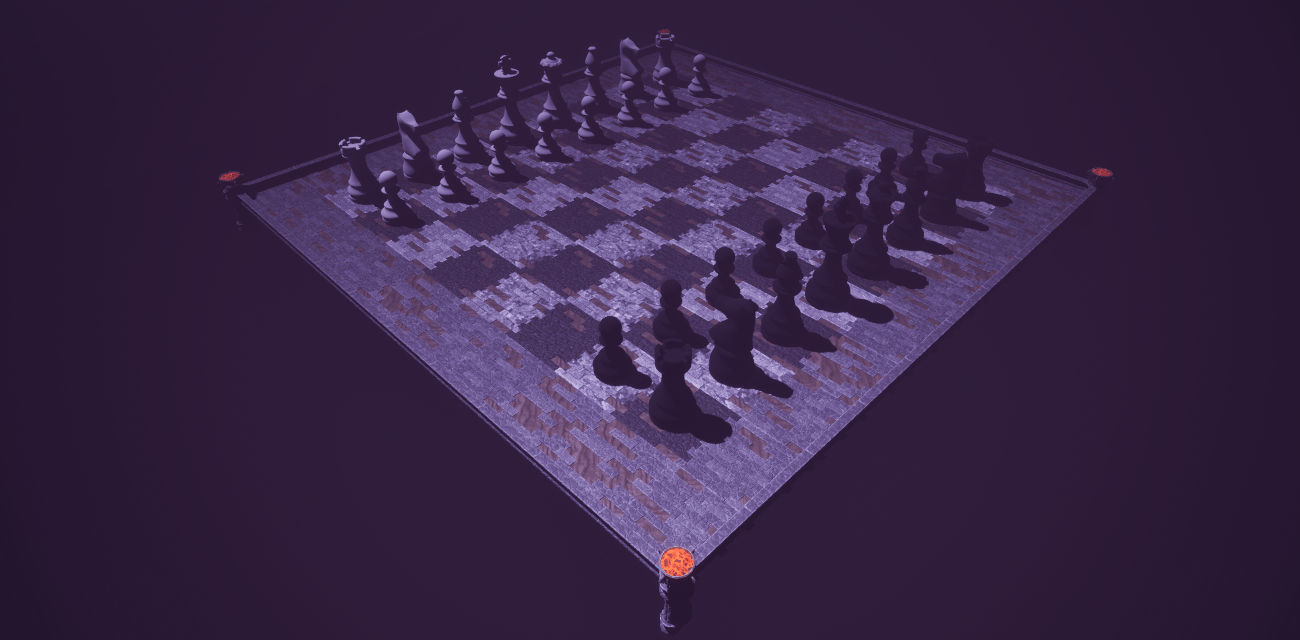
You could walk around, look at things, vibe with the torches – but the game wasn’t really a game yet. It was a beautiful, haunted IKEA showroom.
This week’s big lesson:
If it’s just a static mesh, it’s scenery.
If it reacts to you, it’s game design.
So for Devlog #2, I rebuilt the board setup with actual logic behind it.
Same chessboard. Same pieces. Completely different brain.
Static Meshes vs. Actual Gameplay
My first big realization: I wouldn’t get very far with only static meshes dropped into the level.
Static meshes are great for:
Making things exist
Making screenshots look nice
Convincing yourself you’re “making progress”
But if the board can’t respond to the player, it won’t ever become:
A readable rules system
A playground for tactics and chaos
An actual real-time chess party game
So I started turning my cozy diorama into a system:
tiles now know who’s standing on them, pieces know who owns them, and the game actually reacts when you stand somewhere important.
Same Board, New Brains
From a distance, it looks almost like last time:
Same 8×8 chessboard
Same stylized dungeon floor around it
Same classic chess pieces
But under the hood, it now does things like:
Detect which tile you’re standing on
Check if there’s a piece on that tile
Check if that piece belongs to you
And then say: “Okay, cool. Let’s do chess things.”
This is where the game finally started to feel like more than just “Unreal template walks across some pretty assets.”
Standing on a Tile: Summoning the Magic Circle
Right now, I’ve implemented the first version of piece interaction. Here’s how it works in the prototype:
You walk your little ghost over the board.
When you stand on a tile that has one of your pieces, the game:
Spawns a magic circle under that piece
Treats that piece as “selected”
That magic circle tells you:
“Yes, this is your piece. You’re in control. Do crimes (legally, along chess rules).”
It’s a small thing visually, but it changes the feeling from: “I’m walking around some 3D models” to “I just claimed that piece. Something might happen now.”
That sense of ownership is super important for a party game, especially in first person. Players should never wonder: “Wait, am I interacting with anything right now?”
Highlighting Valid Moves (Starting with Pawns)
Next up was the actual chess logic – or at least the baby version of it. For now, I’ve started simple:
Only pawns have their logic wired up.
When you “select” your pawn (by standing on its tile), the game:
Calculates that pawn’s valid moves (based on its position and direction)
Highlights those tiles on the board
It’s super early and not feature-complete (no capturing diagonally yet, no en passant madness), but even this small step already does a lot for:
Clarity: You instantly see what your options are.
Learning: Even non-chess players can tell: “Oh, this piece can go there.”
Future systems: This lays the groundwork for all pieces later (rooks, bishops, queens, the whole gang).
The long-term vision is to keep readability front and center. This is supposed to be a fast, real-time, no-turns chaos game, but it still needs to feel fair and understandable.

Crosshair Feedback: Green = Go, Red = Nope
The last big addition for this devlog is a tiny feature that does a LOT for feel: a simple crosshair that changes color.
Right now:
The crosshair turns green when you’re looking at a valid move tile
It turns red when the tile is not a valid target
It’s basic, but incredibly helpful:
You don’t have to guess where you’re aiming
You instantly know if the game agrees with your idea
It makes the interaction feel more responsive and intentional
Even without actual movement yet, it already feels like: “I am lining up a move” instead of just wandering around and hoping something works.
What’s Still Missing: Actual Movement
Right now, the game can:
Recognize where you stand
Recognize what piece is yours
Highlight valid pawn moves
Tell you via crosshair if you’re aiming at a valid move
The next obvious step is the big one: Make. The. Pieces. Move.
Coming up next:
Making selected pieces snap to their target tile
Playing a little VFX / SFX to sell that “ghost-powered shove”
Updating scores and ownership when pieces get captured
Starting to tie this into the bigger King Break / points system
Once that’s in, Pushmate will finally feel like an actual chess game, not just a board that lights up and teases you.
Reflections from a Beginner Game Dev
As someone who’s still learning Unreal and game design on the go, this devlog taught me a core lesson: Placing static meshes feels like progress. Coding interaction is progress.
It can be tempting to always fix another texture, add another prop, or move a light around – because that’s visible and easy to screenshot. But the moment the board reacted to my position, the project stopped being “a cool scene” and started to feel like a game prototype.
If you’re also starting out with game dev:
Don’t be afraid to move from “pretty” to “functional” as early as possible.
Even if it’s ugly and janky, getting things to respond to the player is where the real magic starts.